CMS / AEM
ADOBE EXPERIENCE MANAGER 101: KICK-START WITH YOUR NEW CMS
February 25, 2023 • 3 Min Read
ADOBE EXPERIENCE MANAGER 101: KICK-START WITH YOUR NEW CMS
A Beginner’s Guide to know AEM: The journey to create and manage content with Adobe Experience Manager
Hey there! I can feel that you are looking for a new CMS. Whether you’re a seasoned blogger or a newbie website owner, choosing the right CMS can give you hard time. So, after exploring tons of CMS in the last 11 years, I got a suggestion for you. That is, AEM (Adobe Experience Manager)! With that you’re about to embark on a journey that’s both thrilling and challenging — kind of like bungee jumping, but with less screaming. AEM uses a hierarchical authoring system and is part of the Adobe Experience Manager suite, to be specific. CMX offers high-end functionality and can be implemented in a number of different ways. Since you’re in Tech, that’s good to know.
Before we deep dive into the AEM, let’s start with the basics. AEM stands for Adobe Experience Manager, and it’s a CMS designed for enterprise-level websites. What does that mean? Well, it means that AEM is like the Hulk of CMSs — big, powerful, and capable of smashing through any obstacle in its way.
Now, you might be thinking, “Isn’t AEM super complicated? Won’t I need advanced technical knowledge to use it?” Don’t worry! We are here to help you. While AEM does have a bit of a learning curve, it’s not as scary as it seems. Think of it like learning to ride a bike. At first, it might seem impossible to balance and pedal at the same time, but with practice, it becomes second nature.

So, how do you get started with AEM? First, you’ll need to familiarize yourself with the AEM interface. It’s kind of like stepping into the cockpit of a spaceship — lots of buttons, switches, and dials. But don’t panic! Once you get the hang of it, you’ll feel like a space explorer, boldly going where no one has gone before.
Next, you’ll need to learn how to create and manage content in AEM. This is where things get really exciting. With AEM, you can create all sorts of content, from web pages to videos to interactive experiences. You can also collaborate with your team and manage your content from a centralized location. It’s like having a superpower that lets you create anything you can imagine.
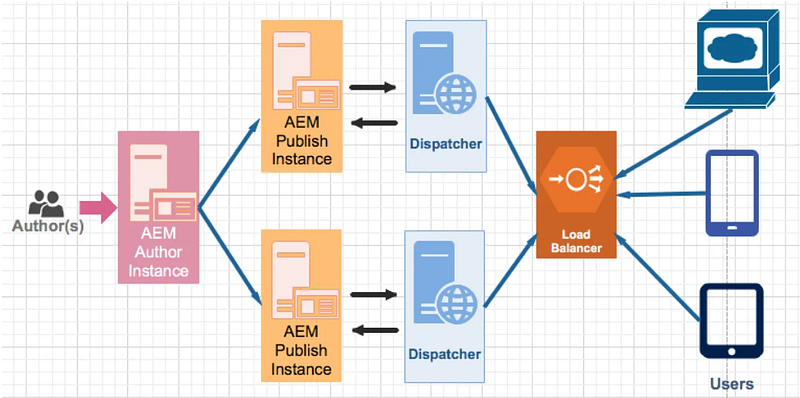
Basic AEM Architecture
But wait, there’s more! AEM also comes with some pretty cool features, such as personalization, analytics, and integrations with other Adobe products. You can use these features to create personalized experiences for your audience, track your website’s performance, and connect your content with other parts of your marketing strategy. It’s like having a Swiss Army knife of digital tools at your disposal.
Lastly, AEM authoring is an adventure worth taking. It might be a bit intimidating at first, but with practice and patience, you’ll become a master of this powerful CMS. So, strap on your space helmet, grab your keyboard and get ready to blast off into the digital universe. It’s going to be a wild ride! Good luck, Buddy!
For more details, write me back to give you a free ride to this cool-stuffed spaceship. See you soon.