WEB ANALYTICS
Why GA4 Alone Is Not Enough: Building a Scalable Analytics Stack with GTM and BigQuery
April 29, 2026 • 10 Min Read
Why GA4 Alone Is Not Enough: Building a Scalable Analytics Stack with GTM and BigQuery
GA4 Is the Starting Point. BigQuery Is Where Real Analytics Begins.
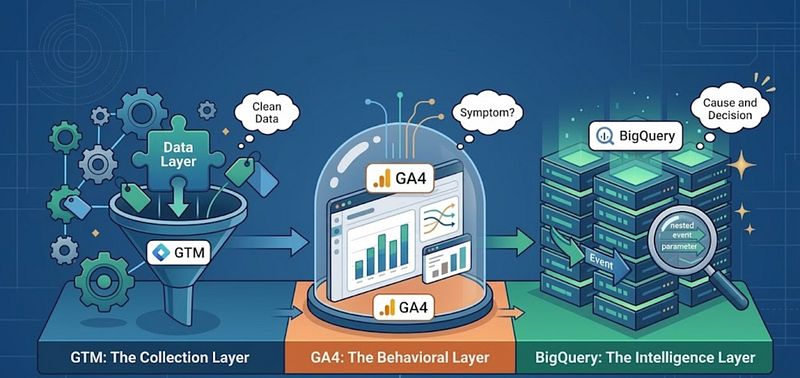
A Scalable Analytics Stack
Most companies do not have an analytics problem because GA4 is missing. They have an analytics problem because GA4 is treated as the final destination.
A tag fires. A report loads. A number goes up. Somebody screenshots it for the weekly review. That is not analytics. That is reporting theater.
If you have spent any real time inside GA4, you already know its ceiling. The moment a leader asks something slightly off the standard report — “How does paid social signup quality compare to organic three months later?” — the interface starts pushing back. You sample. You estimate. You export to a spreadsheet. You quietly stop trusting the answer.
This article is about what comes after that moment. It is about treating GA4 as one part of a stack, not the whole thing, and giving GTM and BigQuery the roles they were designed for.
The Problem With Treating GA4 as the Final Analytics Layer
GA4 is a strong free product. The event-based model is the right direction. The exploration reports are useful. The integration with Google Ads is genuinely valuable for performance marketers.
But GA4 was built as a measurement product, not a data platform. That distinction matters more the larger you grow.
Once you scale, the limits show up quickly:
- Reports get sampled or thresholded, especially on smaller segments.
- Historical data has retention limits inside the UI.
- Attribution is locked to the models GA4 chooses to expose.
- You cannot easily join GA4 data with CRM, ad spend, product backend, or revenue tables.
- Custom business logic — your definition of an “activated user,” your version of a qualified signup — is hard to express inside the interface.
- Funnel debugging at the event-parameter level is painful.
None of this means GA4 is bad. It means GA4 is one layer of a stack. When teams treat it as the entire stack, they end up making strategic decisions on partial information, and they usually do not know how partial it is.
Where GTM Fits: The Collection and Governance Layer
Google Tag Manager is the layer that decides what gets tracked, how it gets tracked, and whether it should be tracked at all.
Done well, GTM is where data quality is born. Done badly, it is where every downstream problem starts.
A serious GTM setup includes:
- Event design: Events are modeled around real user actions and business outcomes, not whatever the developer felt like firing.
- Naming conventions:
signup_completed
signup_complete
SignupDone
These are three different events to GA4. Pick one pattern and enforce it.
- Data layer planning: Pages push structured information to a data layer; tags read from it. This separates business logic from tracking logic and saves months of pain later.
- Parameter collection: The right context — plan tier, content category, internal user ID where allowed, traffic source — must be attached at the event level.
- QA and debugging: Preview mode, DebugView, and a real test plan are part of the workflow, not an afterthought.
- Consent and tracking control: Consent mode, region rules, and PII filtering belong here.
Tracking that is built carelessly in GTM cannot be repaired later in BigQuery. You can clean dirty data, but you cannot invent missing parameters.
Where GA4 Fits: The Behavioral Measurement Layer
GA4 is where business and marketing teams actually look at user behavior day to day. Used inside its strengths, it is excellent.
GA4 is the right tool for:
- User and event tracking with a sensible default model.
- Standard reports for acquisition, engagement, monetization, and retention.
- Exploration reports for funnels, path analysis, and segment overlap when you need a quick answer.
- Audience building that can flow into Google Ads for activation.
- Conversion tracking for the events that matter to the business.
- Marketing and product behavior visibility for a non-technical audience.
A good rule of thumb: if a stakeholder needs a quick directional answer in under five minutes, GA4 is usually the right place to look. If the question requires precision, history, joins, or a custom definition, GA4 is not the right place — but it might still be where the question started.
Where BigQuery Fits: The Raw Data and Intelligence Layer
BigQuery is where analytics stops being a dashboard and starts being a capability.
Once GA4 is exporting events to BigQuery, you own the raw event-level data. Every event, every parameter, every user pseudo ID, with no sampling and no UI-imposed thresholds.
That changes what is possible:
- Event-level data access. You can see exactly what fired, when, with which parameters, for which user.
- SQL analysis. Any question you can express in SQL is answerable. No more being limited to the report templates.
- Joining GA4 with other systems. CRM data, ad spend, subscription revenue, product backend events, support tickets — all of it can sit alongside behavior.
- Custom funnels. Define a funnel the way your product actually works, including conditional steps and time windows.
- Cohort and retention analysis. Build cohorts on any signal — signup source, plan tier, country, first feature used — and track them over real timeframes.
- Attribution analysis. Build models that match how your business actually thinks about credit, not only what GA4 ships by default.
- Data ownership. Your historical data lives in your warehouse, on your schedule.
- Long-term warehouse thinking. GA4 events become one source among many in a proper data layer that can support BI, product analytics, and machine learning later.
The mindset shift is the important part. In GA4, you ask questions the tool was designed to answer. In BigQuery, you ask the questions the business actually has.
Suggested Architecture
For most teams, the working architecture is simpler than people fear:
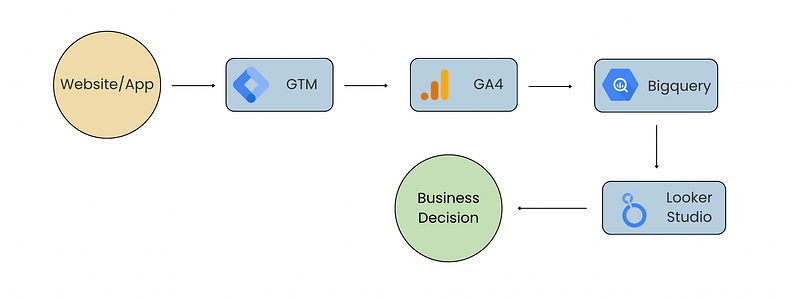
Architecture Flow
GTM collects and governs. GA4 measures and reports. BigQuery stores and analyzes. Looker Studio (or your BI tool of choice) visualizes for the people who do not write SQL.
For more advanced setups — typically when you care about ad blocker resilience, server-side enrichment, or stricter privacy control — the architecture extends:
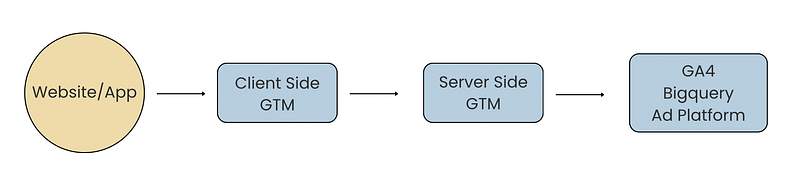
Architecture Flow
Server-side GTM gives you a controlled point where events can be cleaned, enriched, and routed before they reach any vendor. It is not necessary on day one. It becomes worth the effort when tracking quality directly affects revenue decisions.
GTM vs GA4 vs BigQuery at a Glance
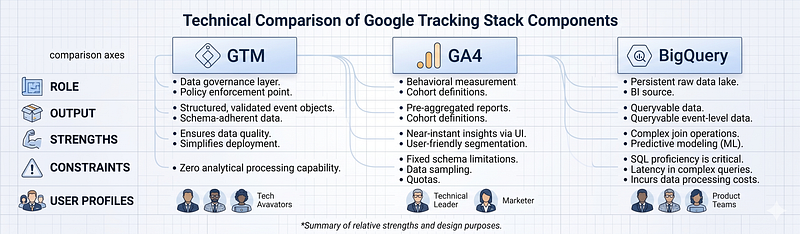
Technical Comparison at a glance
Real Business Use Cases
The stack earns its keep through the questions it can finally answer.
- Marketing attribution beyond GA4 default models. Compare GA4 attribution against your own multi-touch logic in BigQuery, joined with actual revenue.
- Product funnel drop-off analysis. Reconstruct the real signup or checkout funnel with conditional steps, segmented by source, device, and plan.
- Campaign ROI connected with revenue. Join ad spend tables with GA4 sessions and CRM revenue. Measure return on the customers who actually paid, not on form submissions.
- Lead quality analysis. Look at which sources produce signups that become qualified opportunities thirty, sixty, ninety days later.
- Feature adoption tracking. Cohort users by signup week and watch how each cohort adopts a new feature over time.
- User retention and cohort analysis. Slice retention curves by acquisition channel, country, or first-session behavior.
- Customer journey analysis. Stitch web behavior, product events, and support touches into one timeline per user.
- Executive dashboards. Build a small set of trusted, BigQuery-backed metrics that finance, marketing, and product agree on.
Practical Example: Debugging a Signup Funnel
Let’s assume a case. Signup completion drops noticeably week over week. Inside GA4, you can see that it dropped and that mobile looks worse than desktop. That is where the UI usually stops being helpful.
In BigQuery, you query the raw events and find that the drop is concentrated in mobile users coming from paid social, specifically at the email verification step. You join the GA4 events to your CRM and see that the few who do complete have unusually low day-30 retention. You then check your release log and notice a verification email template was changed nine days ago.
GA4 surfaced the symptom. BigQuery isolated the cause and the population it affected. The decision — roll back the email template and re-test — was made in the same afternoon, not the next quarter.
Common Mistakes I See Often
- Installing GA4 without a measurement plan. Tracking starts with business questions, not with tags.
- Poor event naming, mixed casing, and inconsistent verbs. Future you will hate present you for this.
- Too many random custom events that nobody analyzes. Quantity is not quality.
- Missing important parameters on otherwise good events. An event without context is half useful.
- Duplicate tags firing the same event from two places. The numbers will never match anything.
- No QA process before tags go live. DebugView is not optional.
- Treating the GA4 BigQuery export schema as a black box. Read it. Understand the
event_params
user_properties
It pays for itself in a week.
- Not controlling BigQuery cost. Partition your tables, restrict
SELECT *
and monitor query bytes.
- Building dashboards that are not connected to a real business question. A dashboard with no decision attached is decoration.
A Simple Implementation Roadmap
If you are starting from scratch or cleaning up an inherited mess, this sequence works.
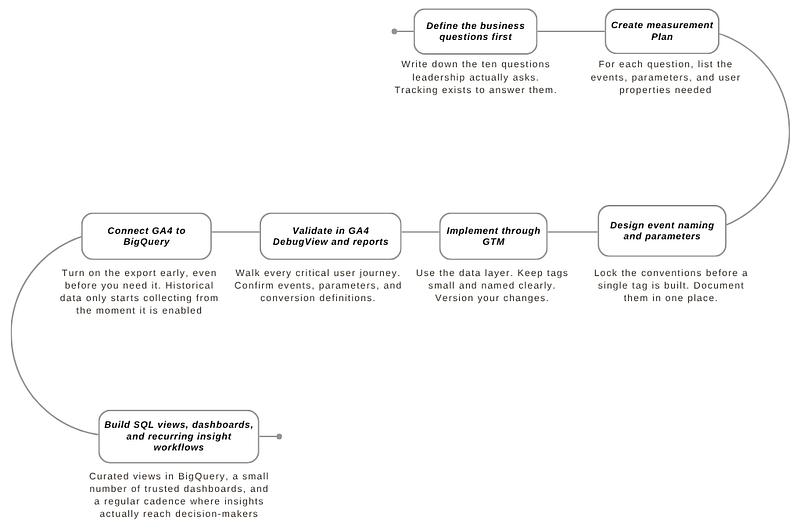
Everything else is optimization on top of this foundation.
Before I close this-
A good analytics stack is not about owning more tools. It is about putting each tool in the role it was built for and refusing to ask any of them to do the job of another.
GTM gets the data right. GA4 makes behavior visible. BigQuery makes the hard questions answerable.
GA4 tells you what happened. BigQuery helps you understand why it happened, who it affected, and what decision should come next.
FAQ
1. Is GA4 enough for a small business or early-stage startup?
For a small site with simple goals, GA4 alone can carry you for a while. The moment you start spending meaningfully on acquisition, joining behavior with revenue, or making product decisions from data, the GA4 BigQuery export should be turned on. It is free to enable on the standard tier within Google’s defined limits, and it future-proofs your data.
2. Do I need a data engineer to use BigQuery with GA4?
Not on day one. A product manager or analyst who is comfortable with SQL can get a long way using the GA4 export schema. A data engineer becomes valuable when you start joining multiple sources, scheduling transformations, and managing cost at scale.
3. How is BigQuery different from a product analytics tool like Amplitude or Mixpanel?
Product analytics tools are optimized for fast, visual exploration of product behavior with a friendly UI. BigQuery is a general-purpose warehouse where you can do anything SQL allows, including joining product data with finance, marketing, and CRM. Many mature teams use both: a product analytics tool for daily exploration and BigQuery as the underlying source of truth.
4. What is the biggest mistake teams make when moving from GA4 to BigQuery?
Skipping the measurement plan. Teams turn on the export, open the raw tables, and immediately get lost in the nested event parameter arrays. Without a clear list of business questions and a clean event design upstream, BigQuery just becomes a more expensive way to be confused.
5. Should I move to server-side GTM right away?
Usually not. Get client-side GTM, GA4, and the BigQuery export working cleanly first. Move to server-side GTM when you have a specific reason: tracking quality issues from ad blockers, the need to enrich events before they reach vendors, stricter privacy requirements, or first-party data strategy. Solving a problem you do not yet have is the most common way to waste a quarter.